
3 valuable tips for using QR codes in your live streams
More and more people access the internet exclusively from smartphones every day!
And this number is even higher in Brazil, where many people get online for the first time on a smartphone.
That’s where QR codes can be a valuable tool to add value to your live streams (Instagram, YouTube, Facebook).
Have you noticed that QR codes are everywhere lately? Restaurant menus, social media, TV ads…
In this article we’ll show you 3 ways to use QR codes in your live streams.
Selling products/services with QR codes
When people make buying decisions, facts matter. Of course they’ll consider a product’s cost and specs. But their emotions matter too, and that’s why live videos are such effective sales tools.
A few things that make a live stream great for selling products and services directly:
- Authentic, charismatic hosts who make you feel like you’re chatting with friends
- Stories about what inspired the designs, making the brand relatable and getting you invested in its success
- Demos and styling tips that help you picture yourself enjoying the product
- A sense of community through references to what’s popular with other customers
Raising money with QR codes
Churches and other places of worship are finding that live streaming is a powerful way to reach their congregation.
- Reach members at home
- Make participation easy through live comments
- Complement your message with graphics and slides
- Record your live stream and broadcast it again later to reach more people with a second live experience
- Targeted Bible studies
When it’s time for the virtual offering, a QR code takes viewers straight to the donation page, letting them give any amount easily.
Of course, fundraising isn’t just for religious organizations. Schools, nonprofits and content creator organizations can also use live streaming to raise money.
Some ideas:
- add a live ticker next to your QR code so your audience can follow your progress toward your fundraising goal
- use on-screen graphics to show donors’ names in real time.
Capturing leads with QR codes
The lead generation potential of QR codes is huge. What kind of hook would appeal to your audience? An e-book? A contest? A coupon?
You don’t need to interrupt the on-screen conversation with a long speech urging people to visit your website. The QR code and a short blurb do all the work.
It’s a good idea to create the QR code with UTM parameters, so you can track who visited your website from the live video and see how they convert.
QR code generators
There are several free online tools for generating QR codes. Here are a few:
- https://br.qr-code-generator.com/
- https://qrcodefacil.com/
- https://www.nuvemshop.com.br/ferramentas/gerador-qrcode
How to add a QR code in OBS
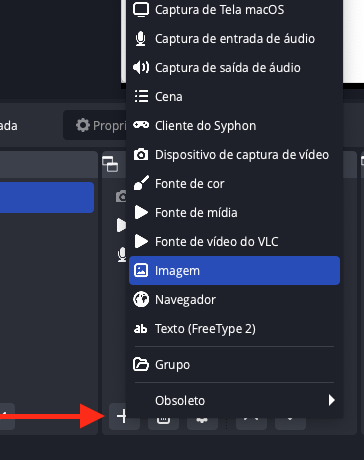
Adding a QR code in OBS is very simple. Here are the steps:
Click the + button (add source) and select Image
Name it QRCode, select the image and position it
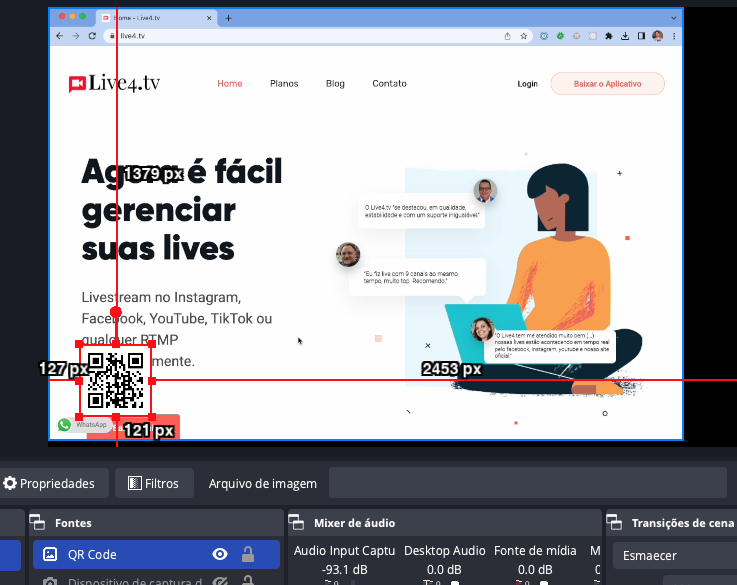
Done! Now you can make it visible whenever you want. To make it even easier, you can add a keyboard shortcut to show or hide it.
QR codes are here to stay
There are many ways to enhance your live stream with QR codes, and many reasons why you should.
There’s a lot of competition for viewers’ time and attention.
The great advantage of QR codes is how easy they make it for people to take the actions you want, whether that’s clicking the buy button, following your social channels or checking out your website.